Setting up ArgoCD in k8s cluster with local User & RBAC
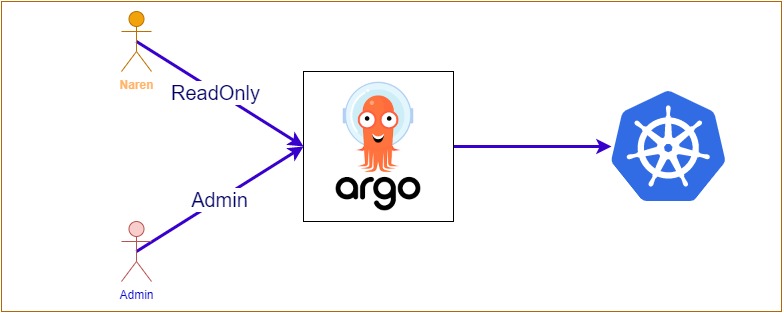
Install the argocd
kubectl create namespace argocd
kubectl apply -n argocd -f https://raw.githubusercontent.com/argoproj/argo-cd/stable/manifests/install.yaml
kubectl patch deployments.apps -n argocd  argocd-server  \
--type=json \
-p='[{"op": "add", "path": "/spec/template/spec/containers/0/args/-", "value": "--insecure"}]'
Install the Argocd CLI
curl -sSL -o argocd-linux-amd64 https://github.com/argoproj/argo-cd/releases/latest/download/argocd-linux-amd64
sudo install -m 555 argocd-linux-amd64 /usr/local/bin/argocd
rm argocd-linux-amd64
Access the argocd
kubectl port-forward svc/argocd-server -n argocd 8080:443
kubectl -n argocd get secret argocd-initial-admin-secret -o jsonpath="{.data.password}" | base64 -d; echo
argocd login localhost:8080  --insecure
argocd account update-password
Set up default policy,role
kubectl patch -n argocd cm argocd-cm --patch='{"data":{"policy.default": "role:readonly" }}'
kubectl patch -n argocd cm argocd-rbac-cm --patch='{"data":{"policy.default": "role:readonly" }}'
Create a local user
username=naren
newpassword=newpassword
curentpassword=curentpassword


kubectl patch -n argocd cm argocd-cm --patch='{"data":{"accounts.'${username}'": "apikey,login" }}'
argocd account list
argocd account update-password  --current-password=${curentpassword} --new-password=${newpassword} --account=${username}
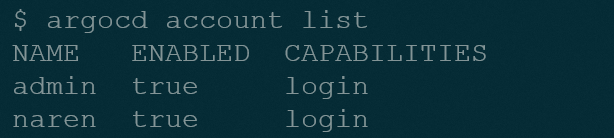

ws: https://killercoda.com/kubernetes/scenario/a-playground
Create new group
cat<< EOF > argocd-patch.yaml
data:
  policy.csv: |
    p, role:org-admin, applications, get, */*, allow
    p, role:org-admin, applications, sync, */*, allow
    p, role:org-admin, logs, get, *, allow

    g, naren, role:admin
  policy.default: role:readonly
EOF

kubectl patch cm -n argocd argocd-rbac-cm --patch-file argocd-patch.yaml
Deploy an application
curl -s https://raw.githubusercontent.com/naren4b/argocd-multi-source-demo/main/sample-app.sh | bash
source : https://github.com/naren4b/nks/edit/main/docs/argocd-rbac.md