Secrets Injection Using Vault Agent Into Kubernetes Pods via Vault Agent Side Containers
Vault Agent : Vault Agent is a client daemon more you can find here : What is Vault Agent?
Install Vault
helm repo add hashicorp https://helm.releases.hashicorp.com
helm repo update
helm install vault hashicorp/vault --set "server.dev.enabled=true"
Configure Vault
Inside the pod
# Enable kv-v2 secrets at the path internal.
vault secrets enable -path=internal kv-v2

#Create a secret at path internal/database/config with a username and password.
vault kv put internal/database/config username="naren" password="mypassword"

# Check the values
vault kv get internal/database/config
Set up kubernetes authentication^
Vault provides a Kubernetes authentication method that enables clients to authenticate with a Kubernetes Service Account Token. This token is provided to each pod when it is created.
# Enable the Kubernetes authentication method.
vault auth enable kubernetes

# Configure the Kubernetes authentication method to use the location of the Kubernetes API. (when running inside the cluster)
vault write auth/kubernetes/config \
      kubernetes_host="https://$KUBERNETES_PORT_443_TCP_ADDR:443"

# Write out the policy named internal-app that enables the read capability for secrets at path internal/data/database/config.
vault policy write internal-app - <<EOF
path "internal/data/database/config" {
   capabilities = ["read"]
}
EOF

# Create a Kubernetes authentication role named internal-app.
vault write auth/kubernetes/role/internal-app \
      bound_service_account_names=internal-app \
      bound_service_account_namespaces=default \
      policies=internal-app \
      ttl=24h

exit
Set up in Kubernetes Create service account
kubectl create sa internal-app
cat<<EOF > deployment.yaml
apiVersion: apps/v1
kind: Deployment
metadata:
   name: orgchart
   labels:
      app: orgchart
spec:
   selector:
      matchLabels:
       app: orgchart
   replicas: 1
   template:
      metadata:
       annotations:
         vault.hashicorp.com/agent-inject: 'true'
         vault.hashicorp.com/role: 'internal-app'
         vault.hashicorp.com/agent-inject-secret-database-config.txt: 'internal/data/database/config'
       labels:
         app: orgchart
      spec:
       serviceAccountName: internal-app
       containers:
         - name: orgchart
           image: jweissig/app:0.0.1
EOF
kubectl apply -f deployment.yaml
Check the Secret
kubectl exec \
      $(kubectl get pod -l app=orgchart -o jsonpath="{.items[0].metadata.name}") \
      --container orgchart -- cat /vault/secrets/database-config.txt
Complete flow
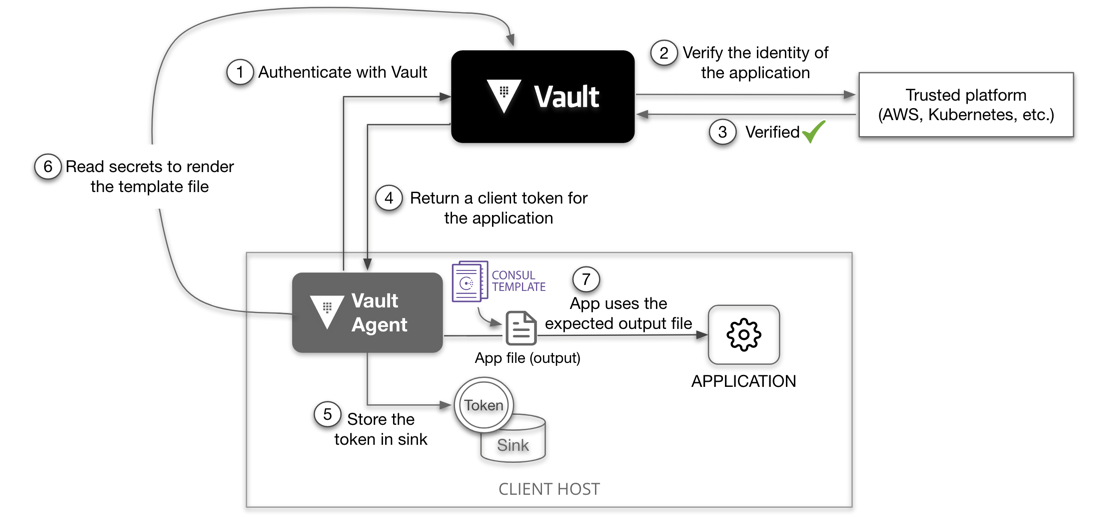
^Vault Authentication Methods
Token Authentication:
Overview: Token authentication is the simplest and most commonly used method. When Vault is initialized or unsealed, it generates a root token by default. This root token has full access to Vault and should be securely stored and used only for administrative tasks.
Usage: Besides the root token, Vault can generate and manage other tokens with limited access and lifetimes. Tokens can be used to authenticate users, applications, or services to access secrets or perform actions within Vault.
Authentication Process: Users provide their token to Vault when accessing resources or performing operations. Vault validates the token against its internal token store and grants access based on the token's policies and capabilities.
Use Cases: Token authentication is suitable for various scenarios, including initial setup, administrative tasks, and user or application authentication.
Kubernetes Authentication:
Overview: Kubernetes authentication enables applications running in Kubernetes clusters to authenticate with Vault seamlessly. It uses Kubernetes Service Account Tokens for authentication.
Configuration: Vault is configured to trust Kubernetes' token-based authentication system. Kubernetes Pods can authenticate with Vault by presenting their Service Account Token.
Dynamic Secrets: Vault can dynamically generate short-lived credentials (e.g., database credentials) for applications based on Kubernetes authentication. This enhances security by minimizing the exposure of long-lived credentials.
Use Cases: Kubernetes authentication is valuable in containerized environments where applications run in Kubernetes Pods. It streamlines access management and enhances security by integrating with Kubernetes' native authentication mechanisms.
ref:
- https://developer.hashicorp.com/vault/tutorials/kubernetes/kubernetes-sidecar#inject-secrets-into-the-pod